← All Projects

Provisioning & access for service partners

Self-serve product expansion for MSP partners — plan, approve, initiate, migrate, and validate without filing a support ticket each time.

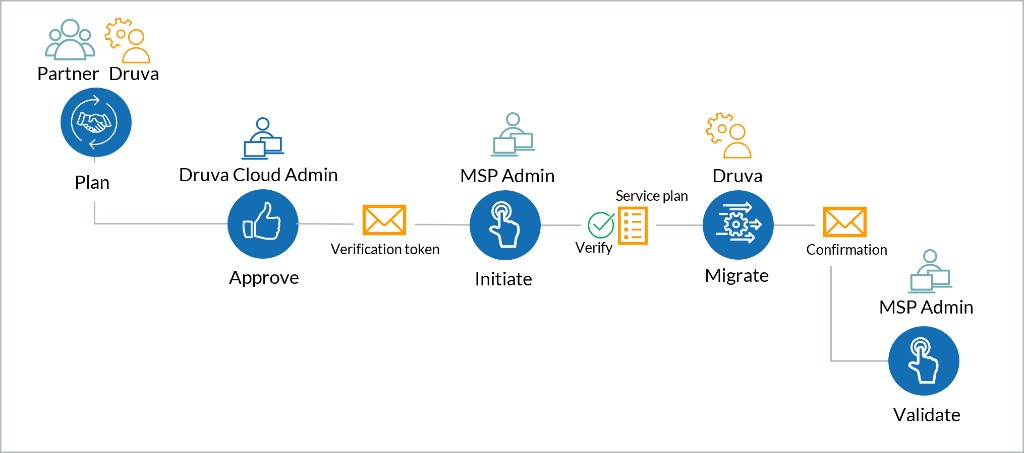
Druva provisioning workflow
Role UX Designer
Scope Self-serve product expansion for MSP partners
Domain MSP Licensing & Access
Stakeholders MSP partners · Support
Product Managers Product managers
Designers Sole designer

Context

Druva

Cloud data protection and management for enterprise.

MSP (Partners)

Managed Service Providers who sell and manage Druva for their own client base.

MSC (Managed Services Center)

The portal MSPs use to provision and manage backup, licensing, and security across every customer from one login.

Existing scenario

Partners

Hit the MSC product ceiling, open a support ticket for every expansion, and risk losing deals they cannot provision.

Customers

Unclear who can see their console; partner access feels all-or-nothing and threatens compliance privacy.

Internal

Support and PMs manually map licenses and complete out-of-set provisioning — high ticket load, slow handoffs.

Preferred scenario

Partners

Self-serve product expansion inside a clear MSC- or Druva-provisioned model — state readable before the click.

Customers

Hold the veto: approve or reject time-boxed partner access with auto-revoke — privacy stays under their control.

Internal

Fewer manual interventions; conversion and access paths are explicit so Support steps in only for true exceptions.

Druva provisioning workflow diagram — Plan, Approve, Initiate, Migrate, and Validate across Partner, Druva Cloud Admin, and MSP Admin
End-to-end provisioning flow. Plan and approve with Druva, initiate and validate as MSP Admin — with verification tokens and service-plan checks at each handoff.

The Problem

Managed service partners (MSPs) couldn’t add new backup products for customers in their own console — so they filed tickets, waited, and sometimes lost the sale.

Licensing rules blocked the obvious fix of “just turn the product on.” The design question: how do partners expand what they sell within those rules — without giving them open-ended access to customer data?

Personas

Priya

MSP Admin · Partner

Runs backup and licensing for dozens of customer companies from the partner console (MSC) every day. Frustrated when a customer wants a new product and the only path is a support ticket.

Needs: Add and expand products for customers without opening a ticket each time.
Chris

Customer Admin · End customer

Owns the company’s backup console and compliance. Worried when a partner has standing access that never expires.

Needs: Partner access that is time-limited and only happens with their approval.

Alex

Druva Support · Internal

Handles license mapping and partner escalations. Buried in tickets for routine product adds that shouldn’t need a human.

Needs: Step in only for real exceptions — not every product add.

User Needs & Core Use Cases

01

Add products to existing customer

Self-serve expansion without re-creating the account.

02

New customer onboarding

Create and provision in one connected journey.

03

Access classification

Managed vs Restricted with clear operational boundaries.

04

Restricted console access

Temporary MSP access — customer approves or rejects.

Four States

MSC- or Druva-provisioned × Restricted or Unrestricted. Partners read state at a glance; invalid conversions blocked before the click.

Restricted Unrestricted
MSC-Provisioned Core products only. No advanced workloads. Full MSP access to console, accounts, and reports.
Druva-Provisioned Licenses provisioned; no console access afterward. Full access plus workloads unavailable to MSC customers.

System Architecture

Every path split across three portals — MSC, S-portal, C-portal — so no responsibility fell through a gap.

  • MSC: Create customers, convert provisioning type, switch access level, request temporary access
  • S-portal: Verify licenses on new products and edit requests
  • C-portal: Accept or reject MSP console access requests

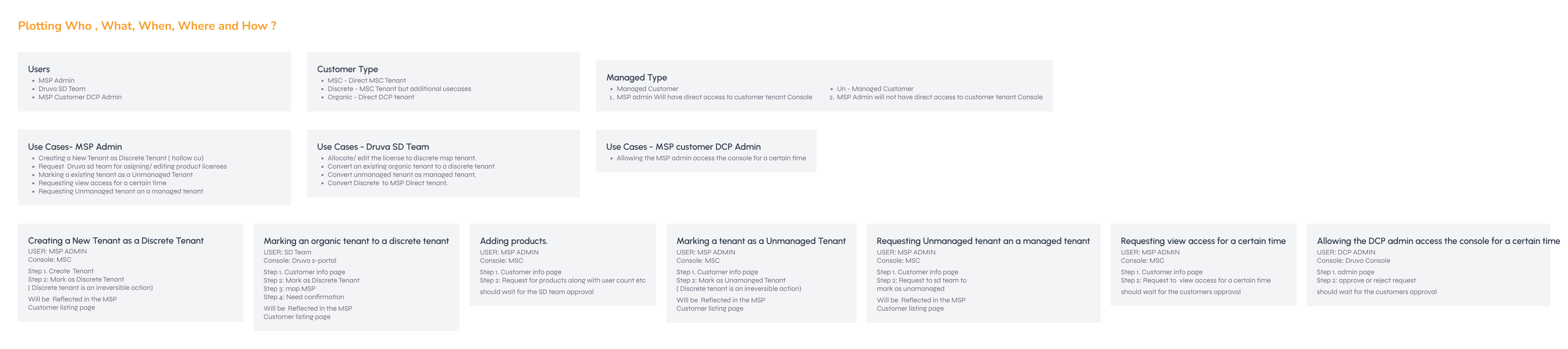
1. Plotting Actors & Actions: A system-mapping pass — who the users are, which consoles they touch, and the what / why / when / where of every action. Laying it out this way let me declutter the actions and see the system as a whole before designing a single screen.

Plotting Actors and Actions system map
Scroll horizontally to read each panel · Expand for full resolution

2. Initial Ideation: For each task, I mapped the basic actions a user actually takes to complete it end to end — turning eight distinct workflows into clear, separate paths instead of one rigid flow.

Initial Ideation workflow maps
Scroll horizontally to read each panel · Expand for full resolution

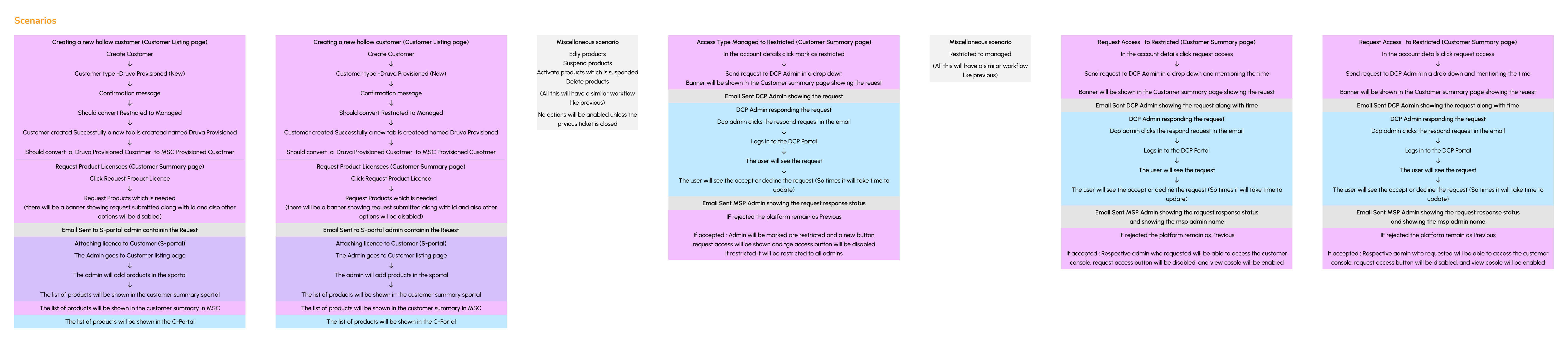
3. End-to-end Scenarios: Decluttering the actions across all three portals — mapping exactly which user, on which page, performs which action, so the creation, conversion, and approval loops held together logically.

End-to-end scenarios across three portals
Scroll horizontally to read each panel · Expand for full resolution

Final UI

What I Designed

01. Make four states legible at a glance

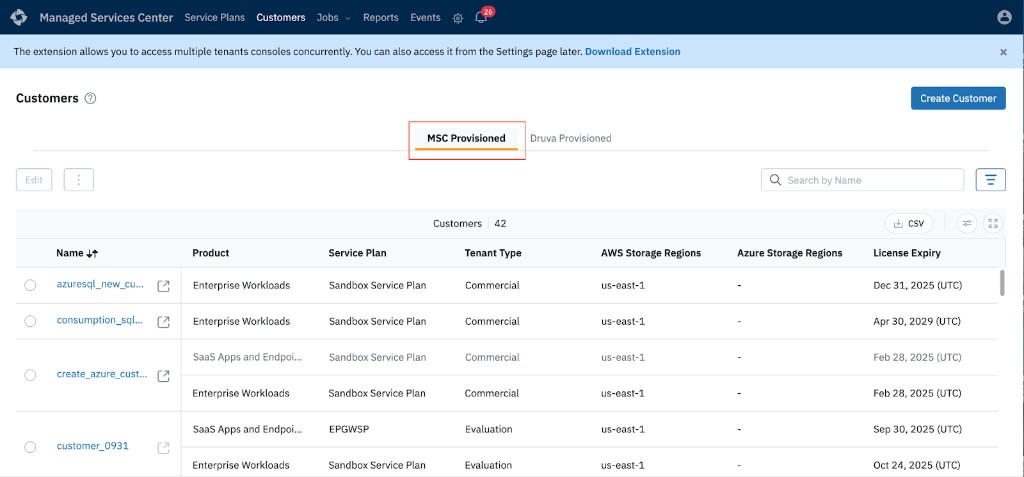
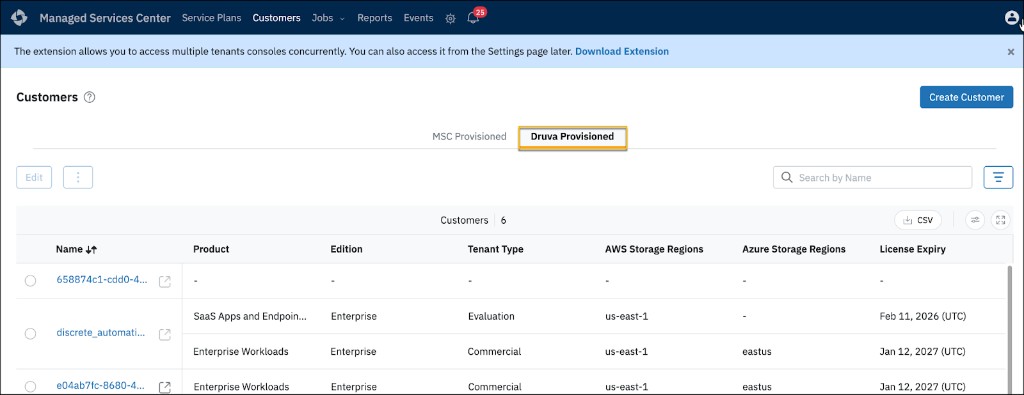
Badges on the customer list show provisioning origin and access state. Actions that don't apply are disabled with a reason, not hidden, so partners learn the rules without a manual.

Customer list
The customer list — provisioning origin and access state read straight off each row.

02. Handle irreversible actions safely

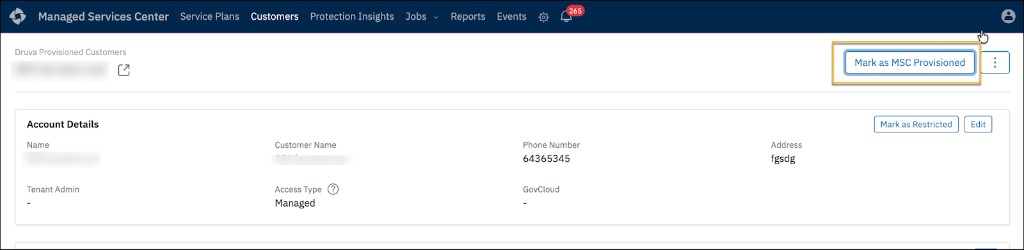
Marking a tenant 'Discrete' cannot be undone. I used a typed confirmation dialog and blocked invalid conversions before the click, rather than throwing an error afterward.

State conversion UI
State conversion — blocking invalid actions upfront and requiring typed confirmation.

03. Resolve privacy with time-boxed access

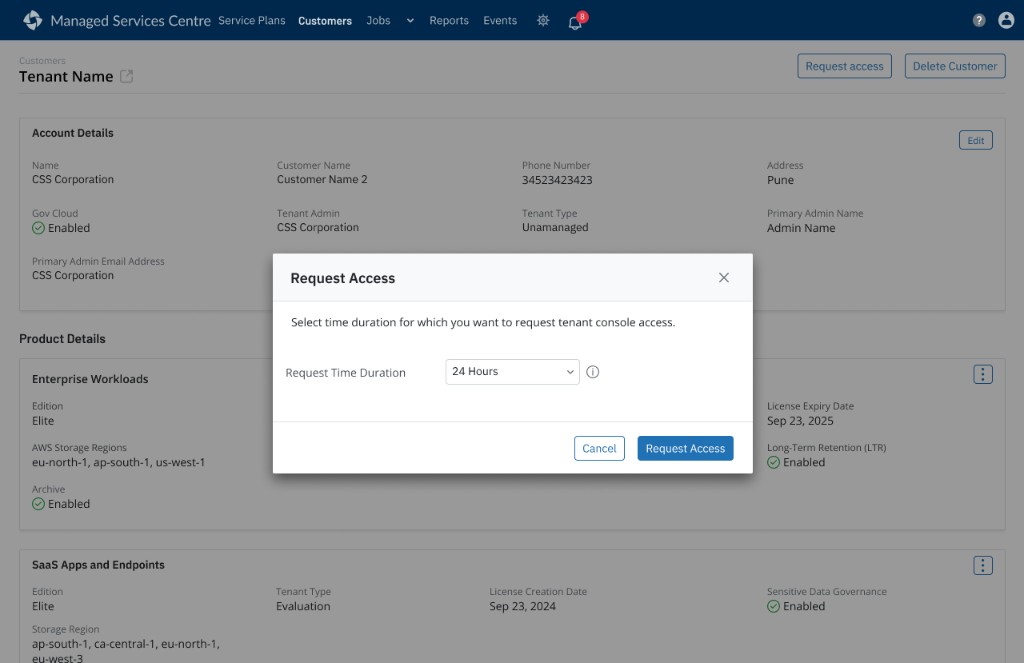
Restricted customers give the partner no standing access. The partner requests a 24-72 hour window, the customer admin approves it, and access auto-revokes precisely at the API layer.

Access request flow
Time-boxed access — the partner requests a window, but the customer admin holds the final veto.

What Shipped

The provisioning and access model inside MSC — how partners onboard customers and manage access daily.

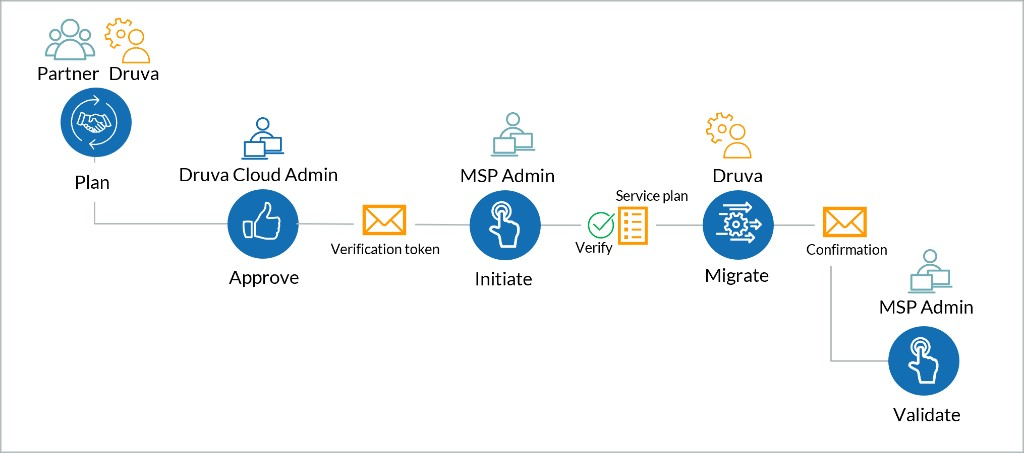
Process flow
Process flow: Visualizing the onboarding sequence.
MSC-provisioned UI
MSC-provisioned: Managing standard tenants.
Druva-provisioned UI
Druva-provisioned: State badges read clearly at a glance.
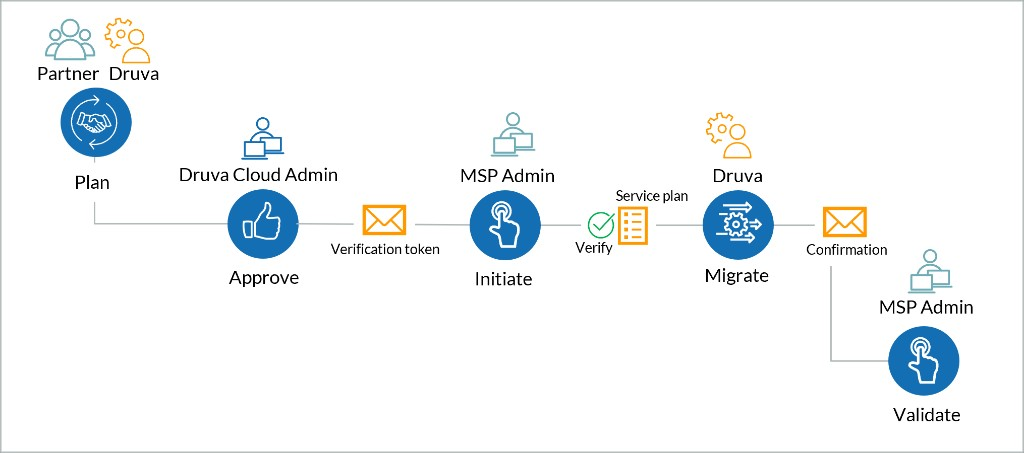
Migration action UI
Migration action: Handling state conversions safely.

Some screens withheld or simplified under NDA.

Outcomes

The Business Impact

Self-serve expansion

Partners provision advanced workloads directly. No support ticket is needed per addition.

Easier management

The four access states read at a glance. Irreversible and invalid conversions are handled deliberately.

Business result

By removing the provisioning ceiling, the design helped MSC bring on more partner customers and drove higher product adoption.

Validated qualitatively with Support and PMs post-launch; growth and adoption are directional outcomes the design enabled, not metrics I measured in isolation.

References & Documentation

MSC vs Druva Provisioned

Explains the fundamental difference between states and their access boundaries.

Migrate Customers to MSC

Details the workflow for migrating existing customers into the new MSC model.

Manage MSC Customers

Outlines how MSPs manage ongoing access and product provisioning daily.

Confidentiality note: This project is under NDA. Design is complete and moving into development.
Interface redrawn and figures synthesized for case study presentation.
The core architectural logic and UX constraints remain true to production.

More work View all work